Photo Export
Free, open-source macOS app to export and back up your iCloud photos to any local or external drive, organized by year and month.
A native, open-source app. No cloud services, no subscriptions, no account required — your photos, your folders.
Why Use Photo Export for Your iCloud Backup?
Photo Export uses Apple's PhotoKit framework — the same system API that powers the built-in Photos app. It sees exactly what your Photos app sees: every photo, video, and album synced through iCloud Photos. No reverse engineering, no private APIs, no workarounds.
This matters because PhotoKit is the only supported way to read the Photos library on macOS. It means the app works reliably across macOS updates, respects your privacy settings, and can request iCloud originals on demand through Apple's own infrastructure. Your credentials never leave your Mac.
Year/Month/ folder hierarchy. Features
Library Browsing
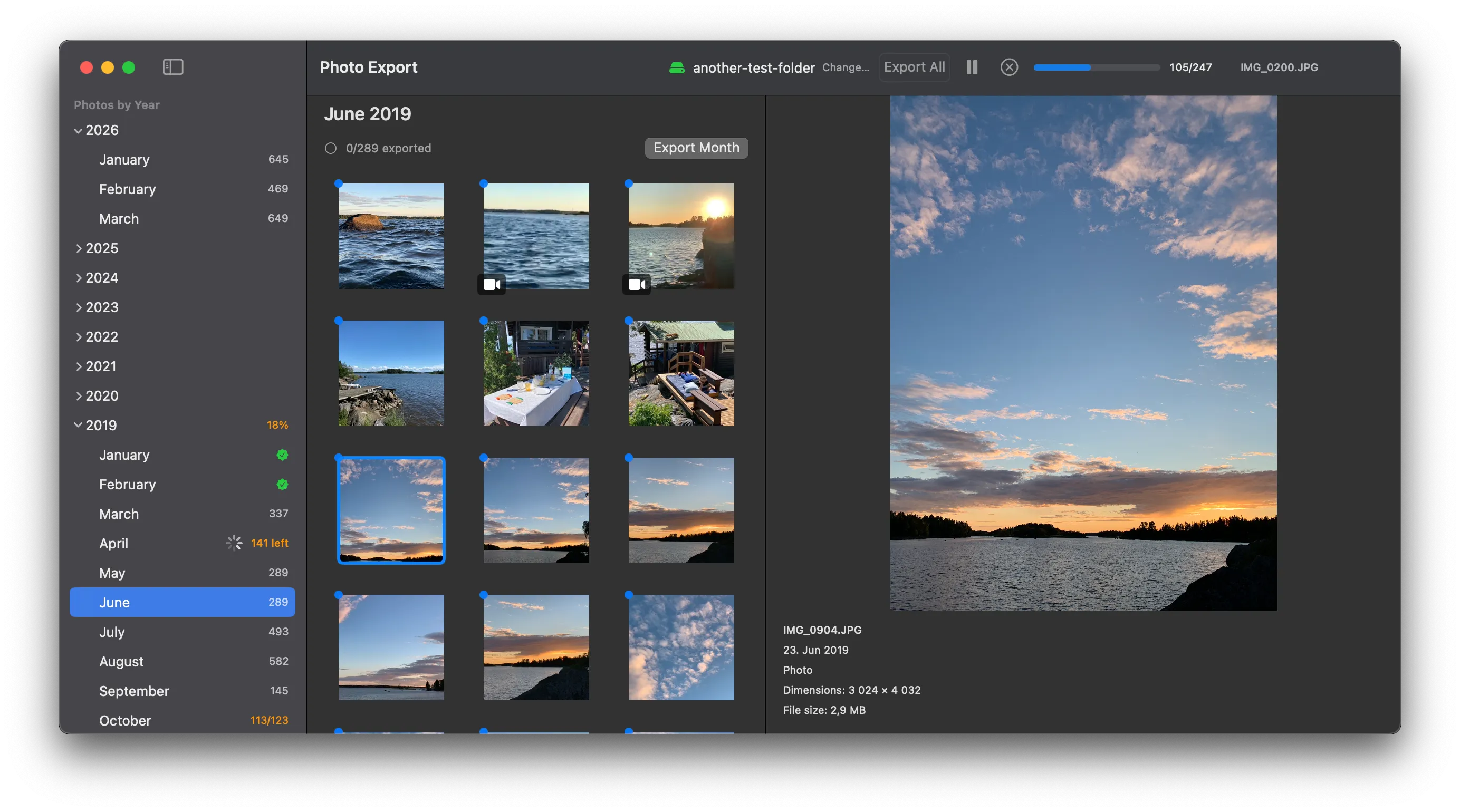
Browse your entire Photos library with a year/month sidebar. See photo counts and export status at a glance.
Thumbnail Previews
Fast thumbnail grid with in-memory caching. Click any photo for a full-size preview.
Smart Export Tracking
Remembers every exported photo. Resume-safe — never re-exports what's already been copied.
Pause / Resume / Cancel
Full control over the export queue. Pause a long export and pick it up later.
Remembers Your Folder
Your chosen destination folder is remembered across app launches — no need to re-select it.
Graceful Error Handling
Handles denied access, unavailable drives, and individual photo failures without crashing the batch.
How to Export Your iCloud Photos in 3 Steps
Prerequisite: Make sure iCloud Photos is enabled on your Mac (System Settings → Apple Account → iCloud → Photos). Photo Export reads your local Photos library, so your iCloud photos need to be syncing to this Mac.
Grant access & pick a folder
Authorize Photos library access and choose a destination folder on any local or external drive.
Browse your library
Navigate by year and month. Preview thumbnails and inspect individual photos before exporting.
Export
Hit export and the app copies original files into an organized Year/Month/ folder tree. Track progress in real time.
Screenshots
Installation
Mac App Store
Coming soon. Automatic updates, trusted distribution. Your purchase supports development of an open-source project.
GitHub Releases (free)
-
Download the latest
.dmgfrom GitHub Releases - Open the DMG and drag Photo Export to your Applications folder
- Launch the app and grant Photos library access when prompted
Ideas for the future
- Concurrent export pipeline for faster throughput
- iCloud originals handling (download or skip remote-only photos)
- Live Photos and paired media support
- Retry failed exports without restarting the batch
- Media filtering and search within the library browser
- Flexible naming schemes beyond year/month
Missing a feature? Open an issue on GitHub and let us know what you need.
Frequently Asked Questions
- Does this work with iCloud Photo Library?
- Yes. Photo Export reads your Apple Photos library, which includes all photos synced via iCloud. It can also download iCloud originals that are stored remotely on demand during export.
- Can I export photos to an external hard drive?
- Absolutely. You can choose any local or external drive as your export destination. The app remembers your choice across launches.
- Will it download iCloud originals that are stored remotely?
- Yes. During export, the app automatically downloads originals from iCloud when they aren't stored locally on your Mac. No manual downloading required.
- Is it free?
- Photo Export is free and open source on GitHub Releases. It's also available as a paid app on the Mac App Store — the purchase supports ongoing development. Both versions are identical in functionality.
- Does it export videos too?
- Yes. The app exports photos and videos. Live Photos are exported as a single still image — full motion export (paired image + video) is planned for a future release.
- What happens if the export is interrupted?
- The app tracks every exported photo. If the export is interrupted, you can resume and it will skip most already-exported files. In rare cases (e.g. a crash mid-write), a file may be copied again.
Get started
Download Photo Export, grant Photos access, and start backing up your library today. Free on GitHub, or support the project on the Mac App Store.
Found a bug or have feedback? We'd love to hear from you.